School ERP for Exam & Report Card Management System Software
Managing examinations is one of the most important and time-sensitive responsibilities in a school. Every assessment requires careful planning, subject configuration, timetable preparation, marks collection, grade calculation, result verification, report card generation, and parent communication. When these activities depend on spreadsheets, registers, handwritten records, and separate applications, even a small mistake can delay the complete result process.
A School ERP for Exam Management brings the complete examination cycle into one organized platform. It works as both School Exam Management Software and School Report Card Management Software, helping teachers, examination coordinators, administrators, and school leaders work with the same academic data while reducing repeated data entry. The system supports different assessment patterns, automates calculations, generates customized report cards, and provides meaningful performance insights for every student.
Schools searching for Exam & Report Card Management Software for Schools generally need more than a marks-entry screen. They need School ERP with Exam Management System capabilities for planning and verification, along with School ERP with Report Card Management features for accurate, customized result publication. An integrated platform combines both requirements without forcing staff to maintain different applications.
For CBSE, ICSE, state-board, private, residential, and multi-branch schools, an examination management module is no longer only a convenience. It is an essential part of accurate academic administration, transparent parent communication, and data-driven student support.

What Is a School Examination Management System?
A School Examination Management System is a digital solution that helps schools plan examinations, record marks, calculate grades, prepare results, and generate student report cards. It may also be described as School ERP Exam & Result Management Software because it connects examination activities with the wider academic database. When integrated with School ERP, it can automatically use existing student, class, section, subject, attendance, and academic-session information.
Teachers do not need to create separate student lists for every examination. The ERP already knows which students belong to a class, which subjects they study, and which teacher is authorized to enter or verify their marks. This connection between different school modules makes the examination process faster and more reliable.
The software can be configured for unit tests, periodic assessments, internal examinations, practical examinations, projects, half-yearly examinations, annual examinations, pre-board examinations, and other school-specific assessment formats. It may also support scholastic and co-scholastic evaluations, descriptive remarks, skills, activities, attendance, and promotion status.
Why Schools Need Online Exam Management Software for Schools
Manual examination management requires coordination between multiple teachers and departments. Marks may be entered into separate spreadsheets, calculations may use different formulas, and report cards may require repeated formatting. This increases the possibility of incorrect totals, missing marks, inconsistent grades, and delayed result publication.
A centralized ERP functions as Online Exam Management Software for Schools by creating a defined workflow. The examination department configures the assessment, teachers enter marks, authorized users verify the entries, and the system calculates results according to approved rules. Management can monitor progress without repeatedly calling teachers for updates. For schools comparing the Best Exam Management Software for Schools, this combination of flexibility, validation, and controlled approval is more important than the number of features advertised.
Schools can use the system to address common examination challenges such as:
- Repetitive marks entry and manual calculations
- Different assessment structures across classes
- Missing or incorrectly entered marks
- Delays in collecting marks from teachers
- Inconsistent grading and rounding methods
- Difficulty preparing customized report cards
- Limited visibility into student performance
- Time-consuming result verification
- Problems maintaining historical academic records
- Delayed communication of results to parents
By standardizing these processes, School ERP software helps the examination team focus more on academic quality and less on administrative repetition.
Core Features of Exam and Report Card Management Software
Examination Structure and Assessment Configuration
Every school follows its own academic calendar and assessment policy. The ERP should allow authorized users to create examination terms, test categories, subjects, maximum marks, passing marks, weightages, practical components, project scores, and grade scales.
The system should support class-wise and subject-wise configurations. For example, primary classes may follow skill-based or descriptive assessment, while senior classes may require theory, practical, internal assessment, and project marks. A flexible structure prevents schools from adjusting their academic policy to fit rigid software.
Support for Different Assessment Patterns
The software can be configured for:
- Unit tests and class tests
- Periodic and formative assessments
- Half-yearly and annual examinations
- Pre-board and practice examinations
- Theory and practical examinations
- Projects, assignments, and activities
- Internal and external assessments
- Scholastic and co-scholastic grading
- Subject enrichment and portfolio evaluation
- School-specific grading structures
Examination Timetable Management
Preparing an examination timetable involves subjects, classes, dates, rooms, shifts, and duration. A digital timetable module can help schools organize this information and make it available to students, teachers, and parents.
Administrators can create class-wise schedules and communicate changes without printing and redistributing notices. When connected with the school mobile app, the final timetable can be shared directly with parents and students.
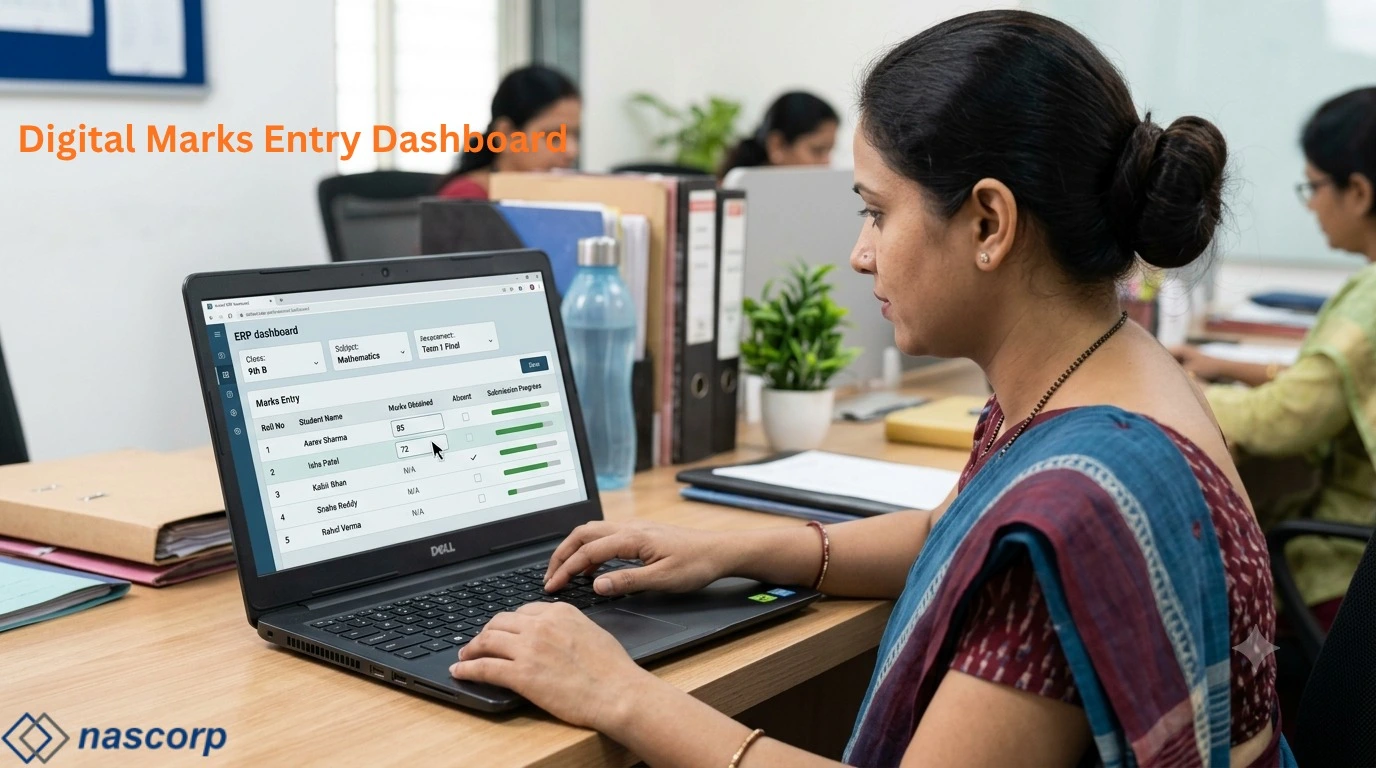
Teacher-Wise Marks Entry
Teachers should receive access only to their assigned classes and subjects. A role-based marks-entry screen makes the process simple and prevents unauthorized changes. Teachers can enter obtained marks, grades, absence status, exemptions, remarks, and practical scores according to the configured examination.
The system may provide controls for incomplete entries, marks exceeding the maximum limit, absent students, and saved-but-not-submitted records. These checks help identify common errors before the result reaches the verification stage.
Marks Entry Status Tracking
The examination coordinator can monitor whether marks for each class and subject are pending, saved, submitted, verified, or approved. This eliminates repeated manual follow-ups and gives the school a clear view of result preparation progress.
School Software for Marks & Grade Management
Manual totals and percentage calculations are vulnerable to errors, especially when subject weightings or multiple assessments are involved. School Software for Marks & Grade Management can calculate totals, percentages, averages, grades, grade points, and overall results using the school's approved formulas.
Automation also creates consistency. The same rules are applied to every student in the relevant class, reducing differences caused by separate spreadsheets or individual calculation methods.
Result Verification and Approval
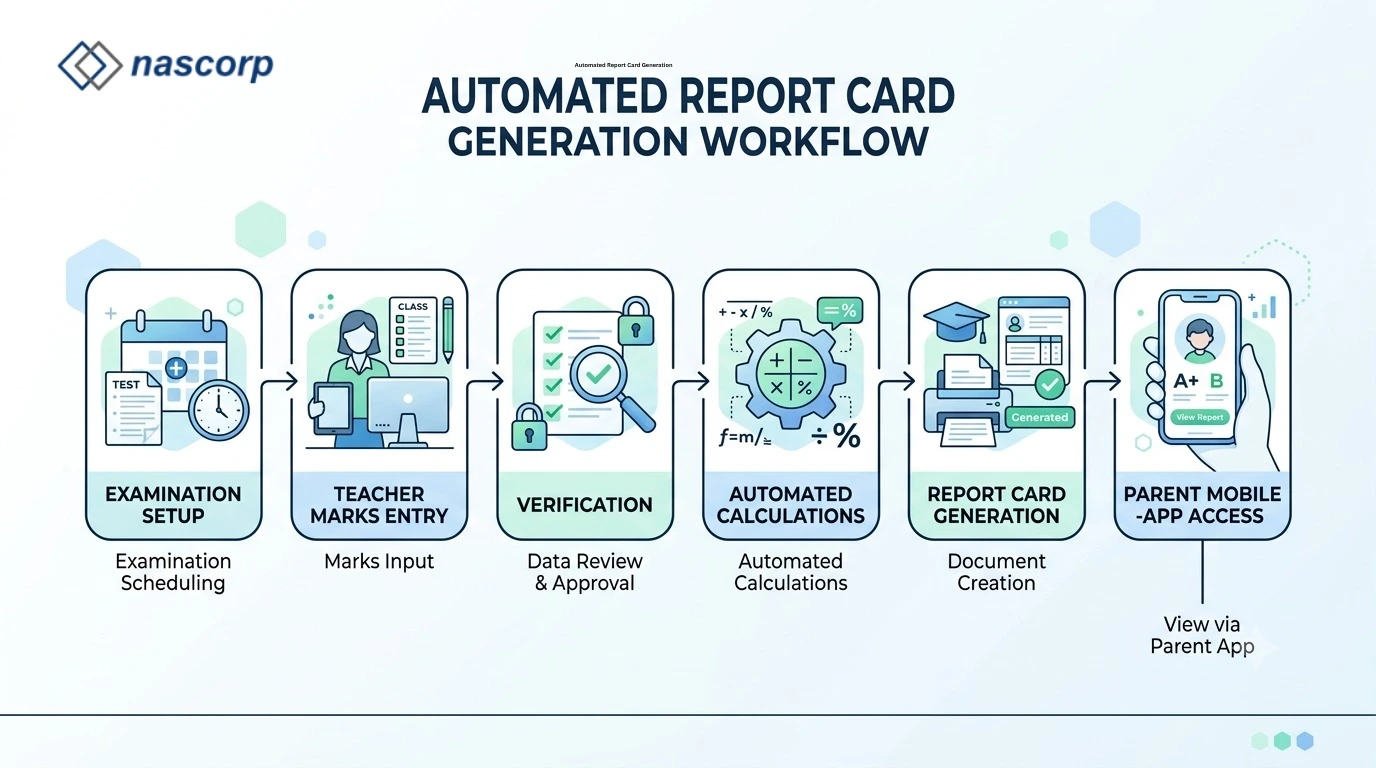
A reliable examination system should not publish results immediately after marks entry. Schools need a verification and approval process so that class teachers, subject teachers, examination coordinators, and authorized management users can review the data.
The software can provide controlled stages such as draft, submitted, verified, approved, and published. After submission, teachers may be prevented from changing marks unless an authorized user reopens the entry. This creates accountability and protects the integrity of examination records.
Simplify your complete examination workflow—request a free School ERP demo.
Automated Report Card Generation Software for Schools
The report card is more than a marks statement. It represents the school's academic standards and communicates a student's progress to parents. Schools may require their logo, address, academic session, student photograph, attendance, marks, grades, skills, remarks, signatures, promotion status, and other information in a specific layout.
Automated Report Card Generation Software for Schools should allow formats to be configured according to the institution's needs. Different templates may be required for pre-primary, primary, middle, secondary, and senior-secondary classes. Once approved, the system can generate report cards in bulk instead of formatting each document separately. Schools evaluating the Best School Report Card Software should check whether the provider can reproduce their real format, calculations, terminology, and signature placement.
Information That Can Appear on a Report Card
Depending on school requirements, a report card may include:
- Student name, admission number, roll number, class, and section
- Parent or guardian details
- Academic session and examination term
- Subject-wise maximum and obtained marks
- Theory, practical, project, and internal assessment scores
- Grades, grade points, percentage, and overall result
- Scholastic and co-scholastic evaluation
- Attendance and working days
- Subject-teacher or class-teacher remarks
- Strengths and areas requiring improvement
- Promotion or result status
- School logo and authorized signatures
Bulk and Individual Report Cards
Schools may need to generate report cards for an entire class, a complete section, selected students, or one student whose card requires correction. The ERP should support both bulk and individual generation. It should also allow authorized users to download or print report cards in a consistent format.
Online Report Card Generation System for Schools
After approval, an Online Report Card Generation System for Schools can make report cards available through the parent portal or school mobile app. Parents can access the results without waiting for a printed copy, while the school maintains a centralized record. The institution can still print report cards when physical copies are required. This makes School ERP with Online Report Card Generation useful for institutions that want both digital convenience and print-ready academic documentation.
Digital access is especially useful for parents who cannot visit the school on the result date. It also reduces requests for duplicate copies because historical records remain accessible according to school policy.
Manual Examination Process vs School ERP
| Examination Activity | Manual or Spreadsheet-Based Process | School ERP-Based Process |
|---|---|---|
| Student lists | Prepared separately for each class | Automatically available from student records |
| Marks entry | Multiple files and formats | Centralized, teacher-wise entry |
| Calculation | Manual formulas and repeated checking | Automated using configured rules |
| Error validation | Depends on individual review | Built-in checks and approval workflow |
| Progress tracking | Follow-up through calls and messages | Real-time marks-entry status |
| Report cards | Individually formatted or mail-merged | Generated in bulk using approved templates |
| Parent communication | Printed copies or separate messages | Portal and mobile app access |
| Historical records | Stored in files and folders | Centralized student-wise academic history |
| Performance analysis | Manually prepared reports | Class, subject, and student analytics |
| Data security | Files may be copied or misplaced | Role-based access and controlled changes |
Student Result Management Software for Schools
Effective Student Result Management Software for Schools does more than generate report cards. It converts examination data into useful academic information. Principals and coordinators can compare class performance, identify subjects with low averages, track students requiring support, and review improvement across multiple assessments. In this role, the ERP also operates as Automated Exam Result Software for Schools, applying approved calculations consistently and preparing analysis without rebuilding spreadsheets after every examination.
Student-Wise Performance
Student-wise reports can show performance across subjects and examinations. Teachers can identify consistent strengths, repeated difficulties, attendance-related concerns, and changes in achievement. These insights help schools plan individual guidance, remedial classes, or parent discussions.
Class and Section Analysis
Class-wise analysis can display average marks, grade distribution, pass percentage, highest and lowest scores, and subject-level performance. When different sections follow the same examination, management can compare results while considering teaching, attendance, and student composition.
Subject-Wise Analysis
Subject analysis helps academic leaders understand where students are performing well or struggling. If many students find the same learning area difficult, the school can review lesson planning, teaching methods, assessment difficulty, and revision requirements.
Using Analytics Responsibly
Performance data should support students rather than label them. Schools should combine examination results with teacher observations, attendance, participation, projects, and other learning evidence. ERP analytics are most valuable when used as a starting point for academic support and not as the only measure of ability.
Role-Based Access and Data Security
Examination information is sensitive and should be accessible only to authorized users. The ERP should provide role-based permissions so that teachers, coordinators, principals, and administrators receive the access required for their responsibilities.
A subject teacher may enter marks only for assigned subjects. A class teacher may review class-level records. The examination coordinator may verify or reopen entries, while final publication may require principal-level approval. These permissions reduce accidental changes and protect confidential student information.
Important security controls can include:
- User-based login credentials
- Class and subject-level permissions
- Controlled marks submission and reopening
- Approval before result publication
- Audit trails for important changes
- Secure backups and access monitoring
- Restricted report card downloads
- Session and password security policies
Schools should ask the ERP provider how information is hosted, backed up, protected, and recovered if a technical problem occurs.
Integration with Other School ERP Modules
The examination system becomes more useful when it connects with other modules rather than operating as isolated software.
Student Information System Integration
Student names, admission numbers, class, section, photograph, parent details, and subject allocation can flow directly from the Student Information System. When a student changes sections or subjects, authorized updates can be reflected across the ERP.
Attendance Integration
The report card may display attendance and total working days. Integrating attendance removes the need to calculate and enter this information separately during result preparation.
Communication and Mobile App Integration
Schools can notify parents when an examination timetable is published or when report cards are available. The same platform may be used for circulars, reminders, and academic updates, creating a consistent communication experience.
Academic and Homework Integration
Connecting examination results with homework, assignments, lesson plans, and classroom activities gives teachers a broader understanding of student progress. This can support more meaningful remarks and intervention planning.
Benefits for Different School Stakeholders
Benefits for Teachers
Teachers receive structured marks-entry screens, automated calculations, and easier access to student records. They spend less time maintaining duplicate files and more time reviewing learning outcomes.
Benefits for Examination Coordinators
Coordinators can configure examinations, monitor submission status, verify entries, control corrections, and generate results through a defined workflow. The system makes responsibilities and pending tasks visible.
Benefits for Principals and Management
School leaders receive consolidated performance reports without waiting for manual analysis. They can monitor result completion, review class and subject trends, and make informed academic decisions.
Benefits for Parents and Students
Parents receive clear, timely, and accessible information. Students benefit when their performance records are accurate, and teachers can identify areas where additional guidance is needed.
How to Choose School ERP for Exam & Result Management
Schools choosing School ERP for Exam & Result Management should evaluate software using their actual assessment structure rather than relying only on a feature presentation. The examination team should prepare sample subjects, marking rules, grades, report card formats, and approval requirements before the demonstration.
Questions to Ask the ERP Provider
- Can the software support our board and assessment pattern?
- Can report card formats be customized for different classes?
- Does it support theory, practical, internal, and project marks?
- Can teachers access only their assigned subjects?
- Is there a marks verification and approval workflow?
- Can report cards be generated in bulk?
- Are historical results maintained student-wise?
- Can parents access results through a mobile app?
- What training and post-implementation support are provided?
- Can existing examination data be migrated?
Test with Real Sample Data
Ask the provider to demonstrate the system using one of your actual class structures and a sample report card. This reveals whether the software can handle the school's calculations, terminology, signatures, remarks, and layout. A real-use demonstration is more reliable than a generic module overview.
Exam Scheduling & Result Management Software
Reliable Exam Scheduling & Result Management Software should connect the beginning and end of the examination cycle. Administrators need to configure dates, subjects, duration, and instructions before the assessment, while teachers and coordinators need structured marks entry, verification, and publication afterward. When scheduling and result preparation remain disconnected, timetable changes may not reach the correct users and examination records become harder to control.
A connected ERP allows the approved timetable to be shared through the parent portal or mobile app. It can then use the same examination structure for marks entry, calculations and result generation. Schools should verify whether timetable changes, absent students, practical components, approval stages and report card publication can be managed without creating parallel spreadsheets.
School Exam & Report Card Software Pricing
School Exam & Report Card Software Pricing depends on factors such as student strength, required modules, report card customization, number of branches, mobile app access, data migration, implementation, training, hosting and technical support. A basic price may appear attractive but provide limited value if the school must pay separately for essential customization or continue manual work.
Schools should request a written quotation that clearly explains included modules, one-time implementation charges, recurring fees, support coverage, data-migration scope and any additional costs. The right comparison is not simply the lowest annual price; it is the total value provided through accurate results, reduced administrative effort, reliable support and a system that can adapt to future assessment requirements.
Implementation Process for Examination ERP
Successful implementation requires more than installing software. The school and provider should first document the existing examination process, roles, calculation rules, templates, and approval stages.
A practical implementation plan may include:
- Requirement collection and workflow mapping
- Class, subject, term, and assessment configuration
- Grade and calculation-rule setup
- Report card template configuration
- User-role and permission assignment
- Sample data entry and result testing
- Teacher and coordinator training
- Verification using previous or mock examination data
- Controlled rollout for the first assessment
- Review and improvement after result publication
Schools should avoid introducing the system immediately before a major examination without adequate testing. A pilot assessment allows teachers to understand the workflow and gives the provider time to resolve configuration issues.
Data Migration and Historical Results
Schools replacing existing software may want to retain previous examination records. Migration feasibility depends on the format, quality, and structure of the available data. Spreadsheets with consistent student identifiers are generally easier to review than unstructured files.
Before migration, schools should decide which academic years, examinations, subjects, marks, grades, and report cards must remain accessible. Data should be cleaned, mapped, tested, and verified before it becomes part of the live system. The original records should also be backed up securely.
Planning to replace a slow or inflexible examination system
Why Consider Nascorp School ERP?
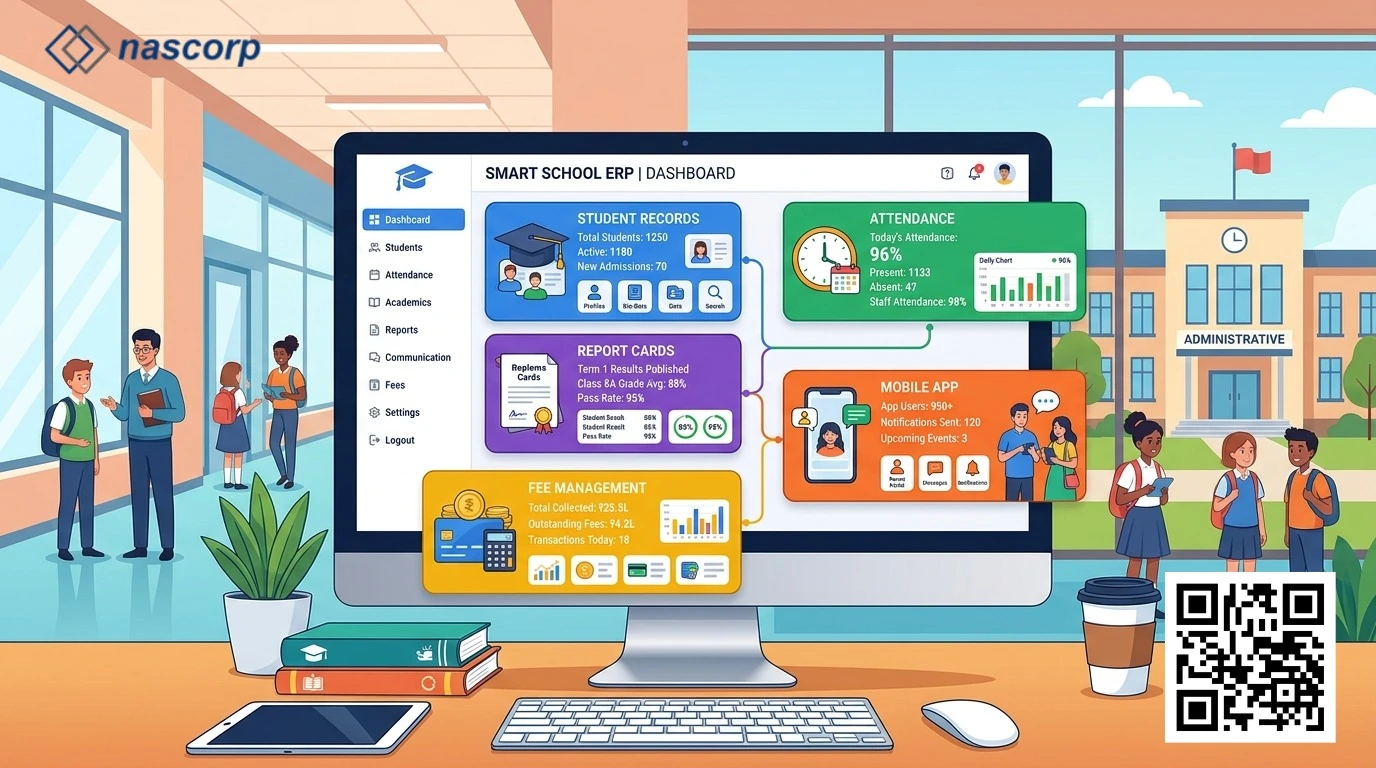
Nascorp Technologies provides a comprehensive School ERP solution for private, CBSE, and multi-branch schools in India. Its integrated platform can help institutions manage student information, admissions, fees, attendance, examinations, report cards, parent communication, transport, HR, payroll, mobile applications, and School MIS.
For examination management, schools can discuss their assessment structure, marks-entry workflow, grade rules, report card formats, user permissions, historical data, and parent-access requirements with the Nascorp team. The objective should be to configure the system around the school's approved academic process and make everyday work easier for teachers and administrators.
A carefully implemented examination ERP can reduce administrative pressure, improve result accuracy, strengthen data security, and provide school leaders with useful academic insights. Most importantly, it helps ensure that every student's performance is recorded and communicated clearly.
Frequently Asked Questions About Exam and Report Card Management Software
1. What is School ERP for Exam and Report Card Management?
It is a digital system that helps schools configure assessments, schedule examinations, enter marks, calculate results, verify data, generate report cards, and share approved results with parents. When integrated with School ERP, it uses existing student, class, subject, attendance, and academic-session information.
2. Can the software support CBSE assessment patterns?
Customizable examination ERP software can support different CBSE assessment structures, subject components, internal assessments, practical marks, grades, and report card formats. The school should demonstrate its exact pattern to the provider before implementation.
3. Can different report card formats be created for different classes?
Yes. Schools may use separate templates for pre-primary, primary, middle, secondary, and senior-secondary classes. The feasibility and level of customization should be confirmed during requirement analysis.
4. Can teachers enter marks from home?
If the ERP is cloud-based and the school permits remote access, teachers may enter marks through secure login. Role-based permissions, submission deadlines, and approval controls should still apply.
5. How does the system prevent marks-entry errors?
It can validate maximum marks, identify missing entries, manage absent status, restrict unauthorized subjects, and require submission and verification. Schools should still follow a human review process before publishing results.
6. Can report cards include attendance and teacher remarks?
Yes. A configured report card may include attendance, working days, class-teacher remarks, subject comments, skills, activities, promotion status, and other school-required information.
7. Can parents download report cards through a mobile app?
Approved report cards can be made available through a parent portal or mobile application, depending on the ERP configuration and school policy.
8. Does the ERP automatically calculate grades and percentages?
The system can calculate totals, percentages, averages, grades, and grade points using configured formulas. These rules must be tested carefully before the first live result.
9. Can marks be changed after submission?
Schools can use a controlled reopening process. After a teacher submits marks, an authorized coordinator or administrator may need to reopen the entry and verify the correction before final approval.
10. Can it manage practical and internal assessment marks separately?
Yes. A flexible examination module can maintain theory, practical, project, internal assessment, and other components separately before applying the approved total or weightage formula.
11. Is bulk report card generation available?
The ERP can generate report cards for a class, section, selected group, or individual student. Schools should test printing, PDF quality, pagination, and signature placement during implementation.
12. Can old examination records be migrated?
Migration may be possible when historical data is available in a structured and accurate format. The provider should review sample files and confirm the scope before migration begins.
13. Can the software provide class and subject performance analysis?
Yes. It can provide student-wise, class-wise, section-wise, subject-wise, grade-distribution, and pass-percentage reports, depending on the available analytics features.
14. Is the examination data secure?
Security depends on access controls, hosting, backups, password policies, audit trails, and the provider's technical practices. Schools should review these controls and define who can enter, verify, approve, publish, and download results.
15. How long does implementation take?
The timeline depends on assessment complexity, report card customization, data migration, user training, integrations, and testing. Schools should plan a pilot before a major result cycle instead of rushing implementation.
Conclusion
A reliable School ERP for Exam & Result Management brings examination planning, marks entry, calculations, approvals, report card generation, publication, and performance analysis into one connected workflow. It helps schools reduce repetitive manual work, improve result accuracy, maintain consistent academic records, and give authorized users faster access to meaningful information.
The right solution should match the school's assessment structure rather than forcing every class and examination into a fixed format. Before selecting a platform, schools should evaluate configuration flexibility, role-based access, calculation rules, report card customization, audit trails, data security, implementation support, and long-term scalability. A carefully planned pilot and proper staff training can make the transition smoother and reduce disruption during important result cycles.
With a well-implemented School ERP Exam & Result Management Software, schools can create a more transparent, efficient, and dependable examination process—from the first exam schedule to the final report card and academic analysis.


